The Simple Starlink Mini Setup Guide for Vans and RVs
Living and working out of a camper van means constant compromise. Space is tight, solar power is limited, and finding a decent signal on the road used to be a full-time job. But when the compact Starlink Mini hit the scene, it completely changed the game for van life nomads.
Unlike old-school satellite dishes that swallow up your storage space and drain your batteries, the Mini is built for vehicle travel. However, getting a bulletproof connection while boondocking deep in the wild requires setting up your roof, batteries, and backup plans to work perfectly together. Let's break down how to get it right.
Van Life Efficiency Win
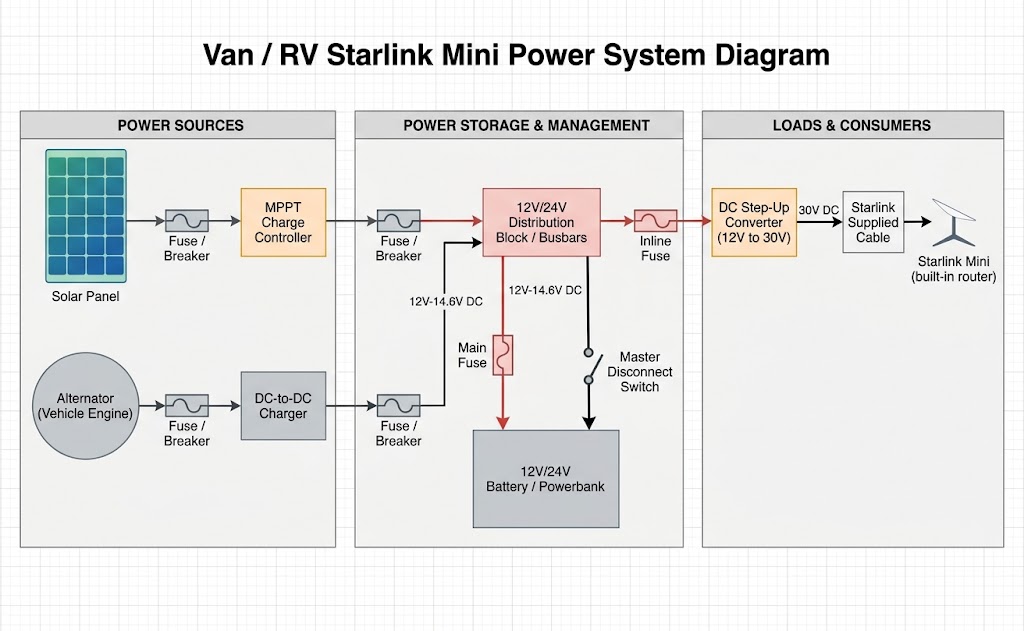
By skipping the inverter and wiring the Mini directly to DC power, the dish sips a tiny 25 to 40 Watts. This means you can crush a full 8-hour remote work shift and drain less than 30 amp-hours from your 12V battery bank. It is an absolute game-changer for cloudy days.
A quick word of warning: custom 12V wiring can sometimes cause issues. If your internet randomly drops offline the exact moment your water pump clicks on or your fridge kicks in, your wire is dropping voltage.
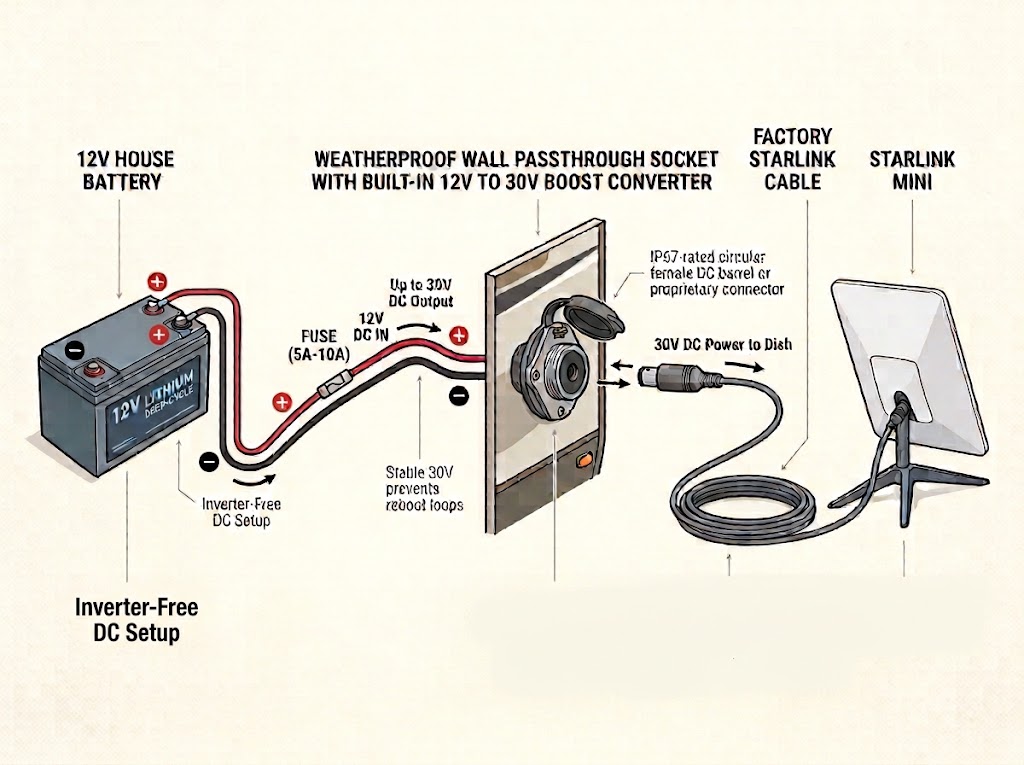
For van lifers, leaving a window cracked for the Starlink cable isn't an option in extreme weather or high-theft areas. The cleanest solution is to install a permanent exterior bulkhead socket. To prevent voltage drops and create a streamlined setup, you can power your Starlink Mini directly from your 12V house battery using a weatherproof wall passthrough socket that features a built-in 12V to 30V DC step-up converter. By wiring this integrated socket directly to your 12V system, it automatically boosts and regulates the voltage to a stable 30V, eliminating the voltage drops that cause unwanted reboot loops. When you set up camp, simply plug the factory-supplied Starlink power cable directly into the exterior passthrough and connect it to your dish. This delivers highly efficient, inverter-free power while keeping your cabin completely sealed from the elements.
Where Do You Mount It? Shaded Campsites vs. Open Skies
Van lifers always face a classic dilemma: do you park under a tree to keep the van cool, or park in the blazing sun to get a clear sky view for your internet? To handle this, most nomads use one of two setups:
- The Permanent Roof Mount: Bolting the dish flat to your roof rack with a wedge bracket. This is incredibly convenient because you have high-speed internet the second you pull into a camp spot. It even allows you to track satellites while driving down the highway. For a closer look at these clean setups, check out our guide on low-profile roof wedge mounts.
- The Portable Tripod: Keeping the dish on a removable stand with a 50-foot extension cable. This lets you park your van comfortably in the shade of the trees while running the dish out into an open clearing to catch a perfect signal.
Why You Still Need a 5G Backup Plan
As amazing as the Starlink Mini is, satellite signals have one major enemy: physical obstacles. If you are stealth camping in a downtown city with tall buildings, or tucked deep inside a narrow, heavily forested canyon, your satellite connection is going to struggle or drop completely.
Mastering the 100GB Data Cap & Streaming on the Road
In early 2026, Starlink officially upgraded their base Roam plan, doubling the high-speed data allowance from 50GB to 100GB per month at no extra cost. While this is a massive win for van lifers, there is a catch: you can no longer purchase extra high-speed data by the gigabyte if you run out. Once you hit that 100GB ceiling, your speeds are throttled to under 1 Mbps for the rest of the billing cycle—which is too slow for Zoom calls or smooth streaming.
If you rely on the Roam 100GB plan instead of stepping up to an Unlimited Roam tier, you need to actively manage your data. Here is how to stretch your 100GB for a full month of remote work and entertainment:
- Cap Your Streaming Resolution: Video streaming is the ultimate data killer. Dive into the settings of your Netflix, YouTube, and Apple TV apps and force the default resolution to 720p or 1080p. Streaming in 4K can burn through 7GB per hour, destroying your monthly cap in a single weekend.
- Lock Down Background Updates: Your smartphone, laptop, and gaming consoles will view the Starlink Mini as a standard high-speed Wi-Fi network and will immediately start downloading massive background OS updates. Set the Mini’s Wi-Fi network to "Metered" on your Windows or Mac devices to halt automatic downloads.
- Utilize Standby Mode: When you are parked in a city with great cell service or staying at a campground with fast Wi-Fi, you don't need to burn your Starlink data. Starlink allows you to pause your service via "Standby Mode," preserving your data and reducing your monthly overhead when you aren't off-grid.
If your job depends on being online, you need a backup plan. Pairing your satellite dish with a multi-carrier cellular router creates a bulletproof setup. Check out our guide on building a satellite vs. 5G cellular backup setup to see how to make your network automatically switch over if one line fails.
Keeping Topped Off on Drive Days
If you like to leave your internet running while traveling between campsites to handle navigation or passenger work sessions, you need to make sure your van is generating enough power on the move. To safely recharge your lithium house batteries from your engine without overheating your electrical system, look at our master layout on utilizing alternator and solar charging infrastructure.